Installing Aggregation Microservice in Azure
This section helps you to install the Aggregation Microservice in Azure.
Procedure:
Follow the below steps to install the Account Aggregation microservice into Azure:
- Copy the generated.zip file (from the target folder) in the installation directory
- Extract the zip file.
- Navigate to the installation directory in command prompt.
- Modify the resourcegroup, location,database details and so on in the install.sh or install.bat script specific to the installation.
- Execute the install.sh or the install.bat.
- Once the installation is done the functions are created in Azure.
- Login to Azure portal and check that the resourcegroup and functionsapps are created.
The master key token can also be retrieved from Azure portal, navigating as highlighted:
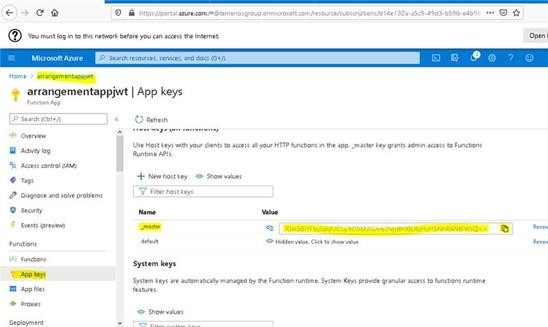
The masterKeyToken value can be used to Invoke Azure API functions from API Client with code(query param) or x-functions-key(header).
The command to be added in Azure Install.bat file
Env variables to be set :
RESOURCE_GROUP_NAME
APP_NAME
subscriptionid rem command to get the subscription Id call az account list | python -c "import json,sys;obj=json.load(sys.stdin); print(obj[0]['id'])" >> out.txt SET /p subscriptionid=< out.txt
masterKeyToken rem command to get the master API token. call az rest --method post --uri "/subscriptions/%subscriptionid%/resourceGroups/%RESOURCE_GROUP_NAME%/providers/Microsoft.Web/sites/%APP_NAME%/host/default/listKeys?api-version=2018-11-01" | python -c "import json,sys;obj=json.load(sys.stdin); print(obj['masterKey'])" >> out.txt SET /p masterKeyToken=< out.txt
The query parameter code as key and masterKeyToken fetched as value can be used to invoke the azure functions or the Header x-functions-key as key and masterKeyToken fetched as value can be used to invoke the azure functions.
In this topic
