Installing Arrangement Microservice in Docker
This section helps you to install the Arrangement Microservice in Docker.
Prerequisites:
- Ensure to install Docker Engine in the deployment environment and turn on Linux containers in Docker.
- Check the properties configuration for ingestion in Feature → Ingestion→ Internal Ingestion→ Arrangement Configuration
Procedure:
- Copy the zip file into the installation directory.
- Extract the zip file. The extracted package contains the configuration files for the docker and the respective bat and sh files.
- To get your microservice up and running, execute the below command which creates an image and docker container for the image:
- For Windows – arrangement.bat up --build –d
- For Linux – arrangement.sh up --build –d
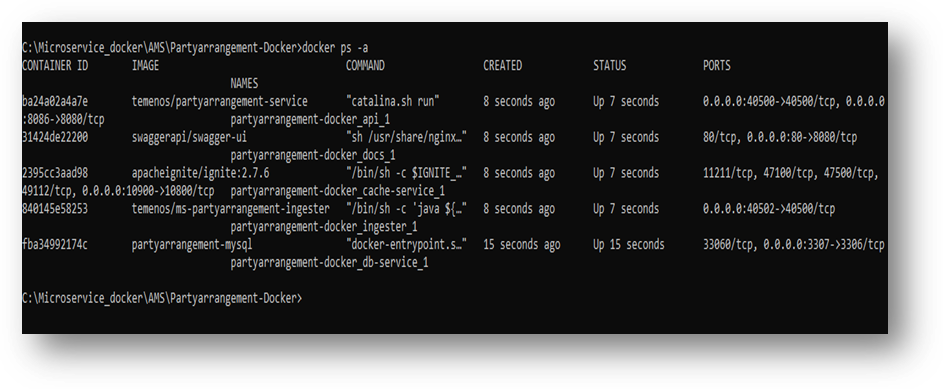
- Use the docker ps –a command to check if the containers are running.
Configuring JOLT Spec
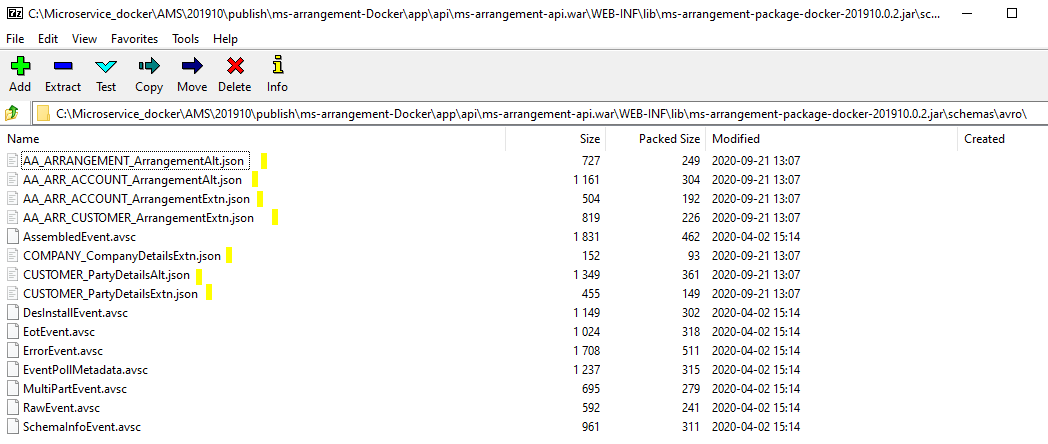
The sample JOLT spec files are available in the following path of the docker package:
ms-arrangement-Docker\app\api\ms-arrangement-api.war\WEB-INF\lib\ms-arrangement-package-docker-201910.0.2.jar\schemas\avro\
Procedure
- Copy the JOLT spec file and place it in your local system.
- Move the JOLT spec files from your local system to the ingestert24 container of the arrangement microservice using the following command:
docker cp <system path> <ingesterT24 container Id>:<path in the container>
Example: docker cpC:\Testing d622fcdc04c9:/etc/mapping
The path where the JOLT spec file is moved in the container should be mentioned in the temn.msf.storage.home and temn.config.file.path property in the ingestert24 container of the yml.
For example,
temn.msf.storage.home: path:/etc/

temn.config.file.path: mapping/
The format of API's URL is given below:
- Base Path
http://<IP_ADDRESS>:<PORT>/<context-root>/api/<version>/
For Example: http://localhost:8300/ms-arrangement-api/api/v1.0.0/
- Resource path of the endpoint can be found in the APIs document. A sample endpoint of Arrangement is http://localhost:8300/ms-arrangement-api/api/v1.0.0/holdings/parties/GB0010001-100100/bulkarrangements
Undeploying Microservices
To stop and remove the existing container, execute the following command from the location where the marketing catalog docker is started.
- For Windows : arrangement.bat down
- For Linux : arrangement.sh down
In this topic
