Introduction to DEBIN (Immediate Debit)
DEBIN is an immediate online transfer service using which the beneficiary (for example, seller) initiates the payment request and the payer (for example, buyer) accepts or rejects the received request. Once the request is accepted, it debits the funds from the payer’s (buyer) account and credits to the beneficiary (seller) account by using COELSA (clearing house for DEBIN payments).
The BCRA (Central Bank of Argentina Republic) appointed the Compensating Chamber of Low Value (COELSA), which is under the direct regulation of the monetary authority, acts as administrator of all DEBIN operations.
The parties (buyer and seller) need to be registered as DEBIN participants with COELSA to use the DEBIN service. The DEBIN workflow is as follows:
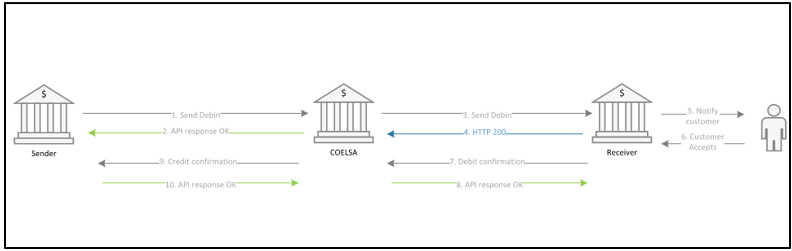
- Beneficiary initiates a debit request (DEBIN order) from any channel to the bank.
- Bank generates the order of DEBIN, registers the minimum data, and sends the request to COELSA.
- Payer’s bank receives the DEBIN request through COELSA and sends DEBIN notification to the customer.
- Payer confirms the transaction and verifies the balance. If feasible, it debits the amount and communicates to COELSA.
- Beneficiary bank credits the beneficiary account once it receives the communication from COELSA.
The below diagram depicts the flow of messages between TPH banks (buyer or seller bank or both) and COELSA.
Debit Order Application
The PPADEB.DEBIT.ORDER application is introduced to capture the payment requests initiated by the seller.
- It captures the payment with Direction as ‘Outward’ and sends it to clearing (COELSA).
- COELSA transmits the payment requests to the respective buyer bank. The incoming requests are also captured in the same application with Direction as ‘Inward’.
- To execute the payment, the buyer in the order needs to perform one of the following:
- If the buyer rejects the request, it is cancelled.
- If buyer accepts the request, it is routed to TPH through
PAYMENT.ORDER(PO)application and the following occurs:- Initiates an outgoing Credit Transfer (CT) in TPH
- Debits the buyer account
- Credits the clearing suspense account
- Moves the status of the payment in TPH to 687 (awaiting acknowledgement)
- Subsequently, COELSA sends an acknowledgment to the buyer bank with response ‘OK’ or ‘Not OK’.
- If ‘OK’, the transaction is considered completed and the status is moved to 999 (Completed).
- If ‘Not OK’, the transaction is reversed and the buyer’s account is credited with the transaction amount and the status is moved to 998 (Reversed).
- At seller’s bank side, this instruction comes as an incoming CT and the bank credits the seller’s account.
The PPADEB.DEBIT.ORDER,INITIATION version allows users to input the COELSA Recurrence Id when initiating a debin order payment.
DEBIN Registration
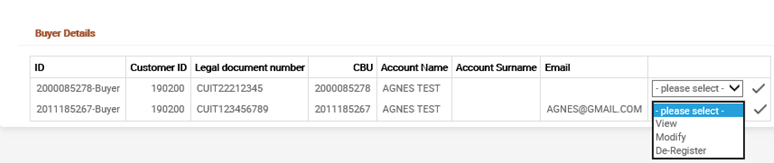
The PPADBR.DEBIN.REGISTRATION application is used for DEBIN registration. When a customer (buyer or seller) approaches the Temenos Transact bank for registration, the below details are captured in the new table and sent to COELSA for confirmation.
The following details are captured in the table:
- Legal Document Number
- Account (CBU) Number
- Customer Bank Code (defaulted from first three positions of 'Account CBU Number')
- Customer Branch Code (defaulted from forth to eighth position of 'Account CBU Number')
- Customer Email Information
During registering, the customer can enter the auto-acceptance conditions by providing values in the Auto Accept Ccy and Auto Accept Amt fields. Once the record is committed, the system sends an IF event with all the details of the record (which is consumed by L2 layer) to move the message to COELSA.
| Activity | Description |
|---|---|
| DEBIN Deregistration |
|
| Status update by L2 layer | On successful deregistration (that is, positive acknowledgment is received from COELSA), the status of the record is updated to ‘Deleted’. NOTE: If a negative acknowledgement is received, the Status remains ‘Active’ and the participant has to deregister again. |
| DEBIN Reactivation |
|
| Status update by L2 layer | On successful reactivation (that is, positive acknowledgment is received from COELSA), the Status of the record is updated to ‘Active’. NOTE: If a negative acknowledgement is received, the Status remains ‘Deleted’ and the participant has to reactivate again. |

Seller Limit Definition
After registration, a seller can set limits. Limits have to be entered in both USD and ARS currency by using the same DEBIN registration table (PPADBR.DEBIN.REGISTRATION) by setting the Action field to ‘Set Limits’.
Once the record is committed, the system sends an IF event with all details of the record (which is consumed by L2 layer) to move the message to clearing (COELSA).
Limit details are maintained in COELSA and no check or validation is done in Temenos Transact.
Recurrence Registration
A seller or buyer can initiate recurrence (opt-in) registration request to each other. On registering recurrence between seller and buyer, an upcoming DEBIN order initiated by the seller is auto accepted at the buyer’s end.
This recurrence registration (opt-in) request can be initiated either by the seller or buyer. Once initiated, the other party has to accept it. There is no option to reject this request. However, the other party can dropout of the registered recurrence post registration.
| Request Type | Description |
|---|---|
| Opt-in | Both the buyer and seller can initiate an ‘Opt-in to recurrence’.
|
| Dropout |
The seller or buyer can dropout of the registered recurrence by initiating a dropout request to COELSA. All the details applicable for opt-in request are required for dropout request with Action field set as ‘False’. NOTE: Only active recurrence records can be used to initiate dropout. The other party (either buyer or seller) cannot accept or reject a record. It is accepted by default.
|
Recurrence Details
An enquiry is provided to list the active or inactive recurrences from system table. To get the updated details from COELSA, bank operators can use PPADBR.RECURRENCE.DETAILS.COELSA enquiry. As part of this request, CUIT of seller and buyer along with CBU of buyer is sent to COELSA. It updates the response received from COELSA in the registered recurrence list and table.
Additionally, another enquiry is available to view only the seller details with active recurrences. Similarly, to get the updated details from the COELSA, it sends the seller CUIT to COESLA and updates the details from clearing to the recurrence table.
Chargeback
Buyer can initiate chargeback for the pre-authorised DEBIN payment.
- On initiating the chargeback, the request is sent to COELSA.
- On receiving the positive response, the reversal is initiated for original transaction at TPH.
Once the payment is reversed, debit order status is updated accordingly. This chargeback notification is forwarded to the seller bank and cannot be rejected as it is already validated by COELSA.
DEBIN Archival
The functionality allows banks to archive the payments after the retention period.
The following items are introduced as part of this functionality:
- The View Debit order History menu allows users to view the list of history files for DEBIN orders.
- The View Debit order Archived menu allows users to view the archived debit orders.
- The PPADEB.DEBIT.ORDER.PRODUCT application allows users to set the Retention Period after which the Debin orders to be moved from live to history.
- The ARCHIVE application allows users to set the Retention Period after which the Debin orders to be moved from history to archive.
MismoTitular for Incoming Domestic Credit Transfers
This functionality allows banks to support payments from Argentina local transfer clearing and to calculate the Mismotitular value. Temenos Payments Hub (TPH) is enhanced to support sending and receiving local domestic transfers from COELSA (Clearing House in Argentina).
TPH will receive the incoming domestic credit transfers and will do the Mismotular value calculation. The Mismotitular value will be captured in the POR.SUPPLEMENTARY.INFO application based on the CUIT (legal ID) value.
Incoming Reversal Processing (Accept or Reject) for Incoming Collection DD
This functionality allows banks to reject direct debit reversal requests from Argentina Clearing (COELSA) for already processed incoming direct debit requests.
A reversal request is a reversal of funds initiated by the creditor after the settlement is completed between banks or accounts.
TPH accepts direct debit reclaim requests, which have been raised within a configurable number of days from direct debit transaction date.
In case the reversal request was previously rejected, TPH will receive a reversal request. This is taken care by the logic which is used in listing the direct debits as part of the enquiry.
If TPH is unable to process the request, the reversal will be moved to the repair queue for manual action by the bank user.
Acceptance of the Rejection Message from Clearing for Inward DD Rejection
This functionality allows banks to receive and accept reclaim messages from Clearing for an Inward DD collection sent by TPH to Clearing. The user is able to view the record in the exception queue
Illustrating Model Parameters
Read the Temenos Payment (PP), Payment Initiation (PI) and Clearing Directory (CA) user guide for information on parameter setup for Argentina clearing.
Illustrating Model Products
This module provides the facility to send and receive Argentina Clearing Payments from COELSA clearing.
In this topic
