TAFJ Multiple Configuration
You can have multiple configuration file with a TAFJ setup. All these configuration files have the .properties extension. The default configuration is hidden in the .default file, which resides in the conf directory.The Eclipse Builder plug-in generates the new configuration files using the Eclipse project name when you toggle a java project to a TAFJ project. You can also define new configurations manually. .properties is the default property file template.
The .default file in the <TAFJ_HOME>/conf directory can be used to set a default configuration. By default, the .default file is set to tafj.properties. The system uses the value in the .default file, when no -cf argument is passed to tCompile (if the value in this file is a valid properties file).
In the examples below, assume that you installed one TAFJ and you have two Temenos Transact releases (R17_3 and R17_5). For Eclipse setup, see TAFJ Eclipse user guide. In this guide, all the setups are done manually.
- Copy .properties in the R17_3.properties and R17_5.properties files respectively.
In your conf directory, you should have the following files:
- .default
- .properties
- R17_3.properties
- R17_5.properties
- Edit R17_3.properties and R17_5.properties.
By conventions, the java and class path for TAFJ of a project have to be set under:
<TAFJ_HOME>/data/<Project_Name>/java and classes
That is for R17_3.properties:
# Specify where the java files will be generated
# by the compiler
#
temn.tafj.directory.java 	= <tafj.home>\data/R17_3/java

# Specify where the classes files will be generated
# by the compiler
#
temn.tafj.directory.classes     = <tafj.home>\data/myProject/classes
Once you are done with the modifications, you can go for a full compilation.
 Example
PROGRAM HELLO
  CRT "Sample program for TAFJCore"
  CRT "Please input your Name : " :
  INPUT NAME
  CRT "HELLO " : NAME
END
Save this program as HELLO.b and compile this program using tCompile.
> tCompile –cf R17_3 HELLO.b
In order to run HELLO for R14_3, you need to type:
tRun -cf R17_3 HELLO
The following output is displayed:
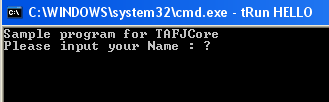
After you enter the name, the following output is displayed:

Run the following commands to compile T24.BP for each R10 and R11 (T24.BP below is a directory of basic files).
- > tCompile -cf R10.properties c:\product\T24\R10\T24.BP
- > tCompile -cf R11.properties c:\product\T24\R11\T24.BP
Run the following command to run a close of business for R17:
tRun -cf R17.properties START.TSM -DEBUG
Run the following command to run a close of business for 201705:
tRun -cf 201705.properties START.TSM -DEBUG
Default Project
As previously mentioned, you can specify a default project in the .default file. For example, a fresh installation will have the default configuration in tafj.properties. Thus, the default file will be tafj.properties.
So in the previous example, if you edit R17_3 or R17_3.properties in the .default file, then you do not need to specify the project when using tRun on the R17 configuration. You need to type:
tRun START.TSM -DEBUG
In this topic
