API and Event Schema Vocabulary Validation
This section explains the functionality, design and implementation of Vocabulary Validation in Microservices Framework.
As a part of Microservices API development, REST API interfaces are developed and published using Open API specifications (OPEN API 3.0). Temenos REST Style guide provides the guidelines for API design across the Temenos products. Also, Temenos maintains a standard Centralized Vocabulary to provide consistent naming conventions in the REST APIs developed across the products in Temenos. It is a guiding standard for defining attribute names used under request, response schemas. Also the resource names and domain names are used while designing REST API interface for Microservices Business Functions.
Vocabulary Validation
The features of vocabulary validation in MSF includes:
- Validate multiple swaggers present in the Microservices
- Validates the resource, domain, property presents in the swagger
- Prepares a consolidated report for the validated swagger documents under the name apivocabvalidations.log file.
- Available in all framework supported environments (i.e. Docker, J2EE, AWS, Azure)
- Easy to implement and use
 Design
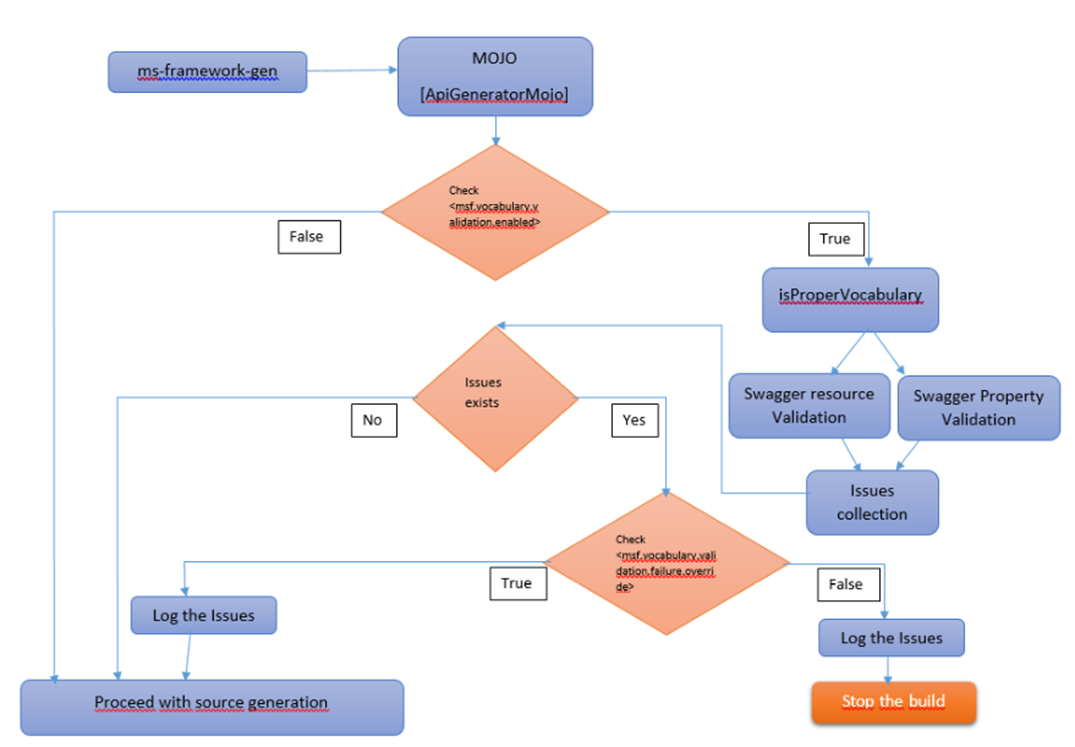
Vocabulary validation feature is designed based on the below flow chart.
An overview of the vocabulary validation in Temenos Microservices Framework.
Internal Working
Vocabulary validation is implemented in the ms-framework-gen Project:
ms-framework-gen project from the framework is getting used for generating API functions and modules to the Microservices. Before the generation of API, the swagger document will get validated against vocabulary-retail.json file present in the irf jar file.
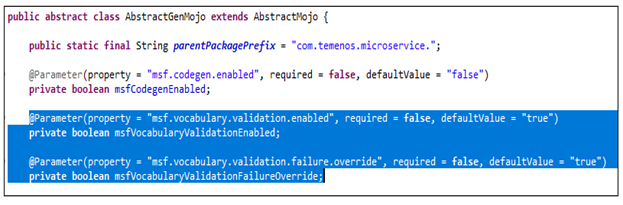
The following properties are maintained in AbstractGenMojo.java.
| Property Name | Description |
|---|---|
| msf.vocabulary.validation.enabled | Toggle if enable/disable the vocabulary validation of APIs |
| msf.vocabulary.validation.failure.override | Toggle if to fail/pass through the prod-factory build if there is any failure occurred in vocabulary validation of APIs |
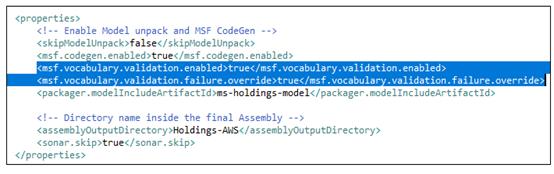
The input for these properties is coming from project pom.xml file.
Implementation
Vocabulary validation is implemented in below microservices:
- ms-payments is a sample SQL based microservice developed for in-house testing purposes. It simulates a payment order management system. Vocab validation report is available in all the stacks Docker, J2EE, AWS, and Azure.
- ms-paymentorder is a sample NOSQL based microservice, developed for in-house testing purposes. It also simulates the payment order management system. Vocab validation report is available in all the stacks Docker, J2EE, AWS, and Azure.
Vocabulary validation is enabled by default but it can be by setting the the below property as false as below in the pom.xml file. To modify the default value of the properties defined in framework, you can provide the properties in project pom.xml as shown below.
The vocabulary validation for the following deployments is shown below:
- Docker - Once the project containing the swagger json file is build we can see the validation log file getting generated inside the <ms-project>-package\<ms-project>-package-docker\target\models\api path. Refer the log of vocabulary validation for more details. Inside the log file consolidated report for the swagger report and we can find the total validation error based on the individual types such as attribute, resource and domain.
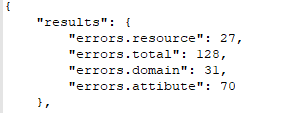
- AWS - Once the project containing the swagger json file is build we can see the validation log file getting generated inside the <ms-project>-package\<ms-project>-package-aws\target\models\api path. Refer the log of vocabulary validation for more details.
- Azure - Once the project containing the swagger json file is build we can see the validation log file getting generated inside the <ms-project>-package\<ms-project>-package-azure\target\models\api path. Refer the log of vocabulary validation for more details.
- J2EE - Once the project containing the swagger json file is build we can see the validation log file getting generated inside the <ms-project>-package\<ms-project>-package-j2ee\target\models\api path. Refer the log of vocabulary validation for more details.
In this topic
